
The shoebox your receipts deserve.
Your shoebox of tax receipts sorts itself out with this native Mac app for freelancers and solo traders! Drop a receipt onto the app window or snap a photo straight from the app, and it automatically captures income, expenses, GST, home office, depreciation and how much you should set aside for your taxes.
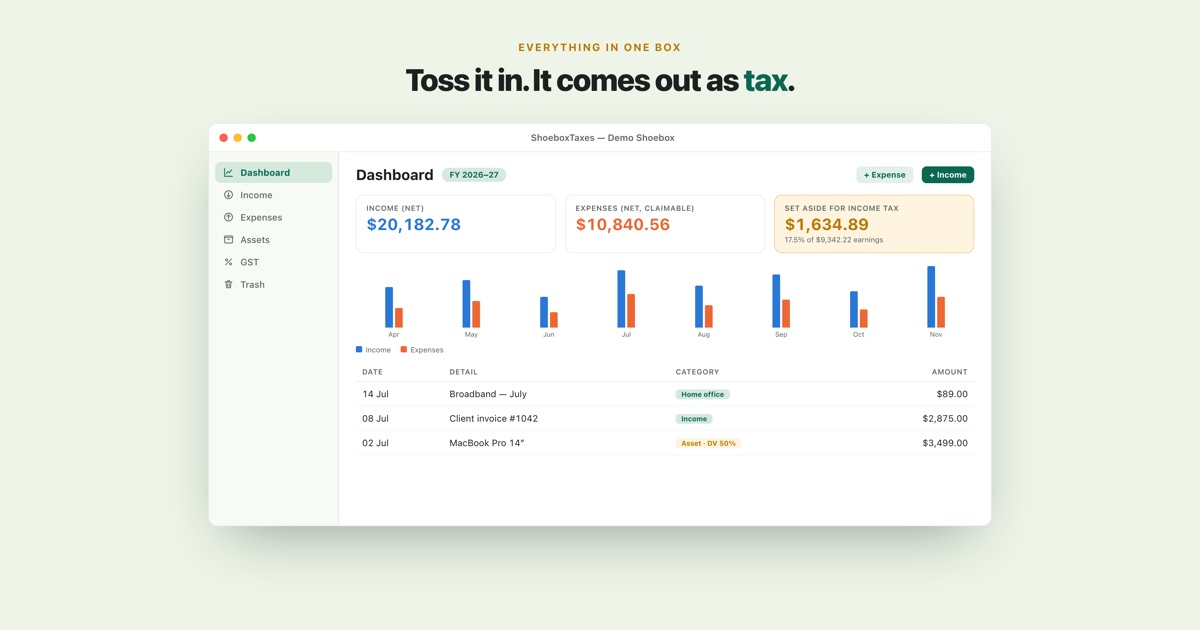
Toss it in. It comes out as tax.
Drop in a document
Drag a PDF or photo of a receipt into the app, or snap one straight from the app window: an iPhone nearby works as a Continuity Camera, and so does your Mac's built-in or a connected camera. On-device OCROptical character recognition: the app reads the text off the page image. reads the date, amount, GST and merchant. You just confirm. The original is kept alongside the record.
GST? Sorted!
Invoice-basis GST returns build themselves from your records, 6-monthly or however you file. Every figure traces back to its source documents.
Know what to set aside
A running income-tax set-aside, so the end of the financial year is a formality, not a scare.
Home office, hands-off
Tag an expense as home office and ShoeboxTaxes spreads the right share (based on floor-area) across power, broadband, rates and interest, with the GST handled properly too. Considering the per square metre rate option? Your choice! Use the app to compare.
Assets that depreciate themselves
Buy a work asset, record it once, and ShoeboxTaxes handles the depreciation from there, using NZ defaults, the $1,000 low-value write-off, and whole-month first-year proration. Less spreadsheet wrangling, more getting on with it. Buy it, record it, done.
Overseas invoices, converted
Bill in AUD, or buy from overseas? Add Inland Revenue's exchange-rates PDF once, and ShoeboxTaxes uses the right monthly rate for each entry: the official one, not today's random internet number. It even notes which document it used, and when.
ShoeboxTaxes Capture – Companion app for iOS
Receipt in. Desk work later. Snap a receipt with your iPhone or iPad, pick its Shoebox and carry on. It travels through your own iCloud account to ShoeboxTaxes for Mac, ready for you to review.
One shoebox: Yours!
No ShoeboxTaxes account, no server, no lock-in: everything you enter stays in one file that's entirely yours. Back it up, keep it in iCloud Drive, or move it wherever you like.
Your numbers never leave your Mac.
Receipt reading, sorting and every calculation stay on your Mac. There is no ShoeboxTaxes server and no tracking. ShoeboxTaxes Capture sends only the receipt images you choose through the private database in your own iCloud account; I never see them. Keep a Shoebox in iCloud Drive if you want it synced between Macs. The Mac app only fetches a public exchange-rates document, and only when you ask it to.
What it doesn't do, on purpose.
Can I submit my tax return from the app?
No, and that's deliberate.
ShoeboxTaxes does the paperwork, not the filing. It prepares your GST summaries and gives you an indication for what to set aside for income tax. Filing stays where it belongs: with you or your accountant. The app never talks to myIR, so nothing is ever submitted on your behalf.
Can I connect my bank account and auto-import transactions?
No. There are no bank logins, no feeds, no third-party aggregators.
Nothing to connect, nothing to break, nothing to leak. A bank transaction tells you that money moved. A receipt or invoice tells you why. Since IRDInland Revenue Department, the New Zealand tax authority. expects the paperwork behind the numbers, ShoeboxTaxes starts with the paperwork. That means you don't end up hunting through emails, drawers and downloads looking for evidence when it's time to file. You just drop in the receipts and invoices you already have, and every record in your books traces back to a real document you can open and inspect yourself.
Who is this for, really?
I built ShoeboxTaxes for myself, a freelancer who wanted his receipts, GST and tax set-aside handled. I wanted to get away from my spreadsheet that I had to duplicate every year and adjust all formulas to match the next year.
Meaning: it isn't tax advice, and there's no guarantee it's correct or that it fits your specific situation. Have your numbers checked by a qualified accountant before you file.
Something not right? Tell me.
Get in touch
ShoeboxTaxes is written and supported by one person. Use the form below, and the reply comes from me.
Let me know...
Your macOS version, the app version (ShoeboxTaxes ▸ About), what you did and what you expected instead. The app reports nothing home, so your description is genuinely all there is to go on.
What I can't help with
Whether your return is right. That one is between you and your accountant. I can fix the app, but I can't check your books.
Write to me
No account, nothing stored on your device, nobody in between. The reply comes from a real address, so you can answer it and attach a screenshot if that says it faster than words.
Coming soon.
ShoeboxTaxes will be on the Mac App Store when it's ready. Until then, the useful thing you can do is say you want in: I'll write back when there's a beta to hand you.
Ask me about the beta